Building Apps
Apps are position-independent ELF files that live on the SD card. The kernel loads them at runtime, resolves syscall symbols, and runs them in their own FreeRTOS task.
✎ Edit on GitHubapp_sdk/. Copy that directory into your project, or reference it from a shared location. No separate installation step.
App SDK overview
The App SDK consists of two things:
app_sdk/include/thistle_app.h— the single header your app includes. Declaresthistle_app_t, theTHISTLE_APP()macro, and all available syscall stubs.app_sdk/CMakeLists.txt— provides thethistle_app()CMake function that compiles your source files into a.app.elfwith the correct flags.
Your app does not link against ESP-IDF, FreeRTOS, or the C standard library. All system services are accessed through the syscall table that the kernel exports at runtime. This keeps your ELF small and independent of the firmware version.
App entry point: thistle_app_t
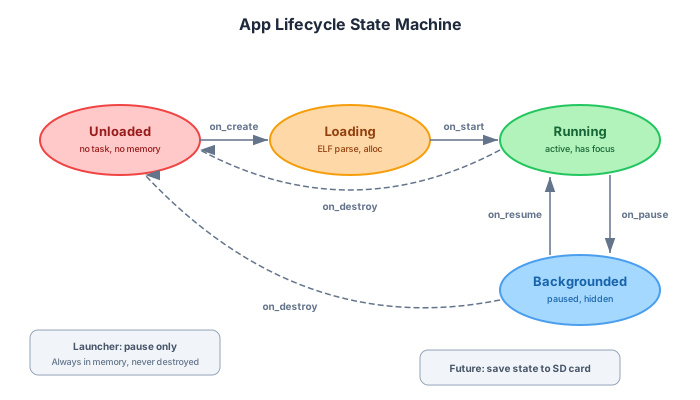
Every app defines one thistle_app_t struct and passes it to the THISTLE_APP() macro. The macro places a pointer to your struct in a special ELF section (.thistle_app) that the kernel reads during loading.
typedef struct {
    const char *id;               // reverse-DNS, e.g. "com.example.myapp"
    const char *name;             // display name shown in launcher
    const char *version;          // semver string "1.0.0"
    bool        allow_background;  // keep running when another app is foreground
    int        (*on_create)(void);   // allocate resources; return 0 = OK
    void       (*on_start)(void);    // build UI, start tasks
    void       (*on_pause)(void);    // another app came to foreground
    void       (*on_resume)(void);   // back in foreground
    void       (*on_destroy)(void);  // user closed the app; free everything
} thistle_app_t;
Lifecycle
Available syscalls
System
void     thistle_log(const char *tag, const char *fmt, ...);
uint32_t thistle_millis(void);
void     thistle_delay(uint32_t ms);
void    *thistle_malloc(size_t size);  // allocates from PSRAM
void     thistle_free(void *ptr);
Display
Apps use LVGL directly — all LVGL symbols are exported through the syscall table. The display syscalls are convenience helpers for reading screen dimensions.
uint16_t thistle_display_get_width(void);
uint16_t thistle_display_get_height(void);
Input
typedef void (*thistle_input_cb_t)(int event_type, int keycode,
                                       int x, int y);
void thistle_input_register_cb(thistle_input_cb_t cb);
Radio (requires PERM_RADIO)
int thistle_radio_send(const uint8_t *data, size_t len);
int thistle_radio_set_freq(uint32_t freq_hz);
GPS (requires PERM_GPS)
int thistle_gps_enable(void);
int thistle_gps_get_lat_lon(double *lat, double *lon);
Storage (requires PERM_STORAGE)
App paths are relative to /spiffs/data/apps/<manifest-id>/. Absolute paths and paths containing . or .. are rejected. File handles are private to the app that opened them; shared storage requires a future explicit broker API.
void *thistle_fs_open (const char *relative_path, const char *mode);
int   thistle_fs_read (void *buf, size_t size, size_t count, void *stream);
int   thistle_fs_write(const void *buf, size_t size, size_t count, void *stream);
int   thistle_fs_close(void *stream);
Migration: remove legacy /spiffs/ or /sdcard/ prefixes from app file paths. Existing data must be copied once into the app's manifest-ID root by a trusted system migration; apps cannot import arbitrary legacy paths themselves.
IPC (requires PERM_IPC)
int thistle_msg_send(uint32_t dst_app, uint32_t type,
                     const void *data, size_t len);
int thistle_msg_recv(uint32_t *src_app, uint32_t *type,
                     void *data, size_t *len, uint32_t timeout_ms);
Power
uint16_t thistle_power_get_battery_mv(void);
uint8_t  thistle_power_get_battery_pct(void);
Building with CMake
Create a directory for your app and write a CMakeLists.txt:
cmake_minimum_required(VERSION 3.16)
project(my_app)

# Point to the App SDK directory
set(THISTLE_SDK_PATH "/path/to/esp32-os/app_sdk")
include(${THISTLE_SDK_PATH}/CMakeLists.txt)

# List all your .c source files
thistle_app(my_app SRCS main.c ui.c)
Build with standard CMake + the Xtensa toolchain that ships with ESP-IDF:
export IDF_PATH=~/esp/esp-idf
source $IDF_PATH/export.sh

cmake -B build -DCMAKE_TOOLCHAIN_FILE=$IDF_PATH/tools/cmake/toolchain-esp32s3.cmake
cmake --build build

# Output: build/my_app.app.elf
LVGL UI patterns
LVGL runs in the kernel's UI task. All LVGL calls from your app must happen on that same task — the easiest way is to do everything in on_start() and LVGL event callbacks (which also run on the UI task).
Create a label
static void my_start(void)
{
    lv_obj_t *screen = lv_scr_act();

    lv_obj_t *label = lv_label_create(screen);
    lv_label_set_text(label, "Hello from my app!");
    lv_obj_center(label);
}
Handle button press
static void btn_handler(lv_event_t *e)
{
    thistle_log("myapp", "Button pressed!");
}

lv_obj_t *btn = lv_btn_create(screen);
lv_obj_add_event_cb(btn, btn_handler, LV_EVENT_CLICKED, NULL);
lv_obj_set_size(btn, 120, 40);
lv_obj_center(btn);
Handle keyboard input via syscall
static void input_cb(int event_type, int keycode, int x, int y)
{
    if (event_type == HAL_INPUT_EVENT_KEY_DOWN) {
        thistle_log("myapp", "Key: %d", keycode);
    }
}

// Register in on_create or on_start
thistle_input_register_cb(input_cb);
Example: Hello World walkthrough
The complete hello world app from app_sdk/examples/hello_world/main.c:
#include "thistle_app.h"

static int hello_create(void)
{
    thistle_log("hello", "Hello World app created!");
    return 0;
}

static void hello_start(void)
{
    lv_obj_t *label = lv_label_create(lv_scr_act());
    lv_label_set_text(label, "Hello from ThistleOS!");
    lv_obj_center(label);
}

static void hello_pause(void)   {}
static void hello_resume(void)  {}
static void hello_destroy(void) {}

static const thistle_app_t hello_app = {
    .id               = "com.example.hello",
    .name             = "Hello World",
    .version          = "1.0.0",
    .allow_background = false,
    .on_create        = hello_create,
    .on_start         = hello_start,
    .on_pause         = hello_pause,
    .on_resume        = hello_resume,
    .on_destroy       = hello_destroy,
};

THISTLE_APP(hello_app);
Example: Chat app with LoRa radio
A more realistic app that sends and receives LoRa messages and displays them in an LVGL list:
#include "thistle_app.h"

static lv_obj_t *g_list;
static lv_obj_t *g_input;

/* Called from radio RX callback (runs in radio task) */
static void on_radio_rx(const uint8_t *data, size_t len,
                        int rssi, void *user)
{
    /* Schedule label creation on LVGL task via event */
    /* (simplified — real code needs thread-safe queue) */
    char buf[128];
    snprintf(buf, sizeof(buf), "[%d dBm] %.*s", rssi, (int)len, data);
    lv_list_add_text(g_list, buf);
}

static int chat_create(void)
{
    thistle_radio_set_freq(915000000);
    return 0;
}

static void send_btn_cb(lv_event_t *e)
{
    const char *txt = lv_textarea_get_text(g_input);
    thistle_radio_send((const uint8_t *)txt, strlen(txt));
    lv_textarea_set_text(g_input, "");
}

static void chat_start(void)
{
    lv_obj_t *scr = lv_scr_act();
    g_list  = lv_list_create(scr);
    g_input = lv_textarea_create(scr);
    lv_obj_t *btn = lv_btn_create(scr);
    lv_obj_add_event_cb(btn, send_btn_cb, LV_EVENT_CLICKED, NULL);
    lv_label_set_text(lv_label_create(btn), "Send");
}

static const thistle_app_t chat_app = {
    .id               = "com.example.chat",
    .name             = "LoRa Chat",
    .version          = "1.0.0",
    .allow_background = true,  // keep receiving in background
    .on_create  = chat_create,
    .on_start   = chat_start,
    .on_pause   = NULL,
    .on_resume  = NULL,
    .on_destroy = NULL,
};

THISTLE_APP(chat_app);lv_async_call() or post a message to your own queue and process it in an LVGL timer callback.
Packaging and installing
After building, copy the .app.elf to the SD card:
cp build/my_app.app.elf /path/to/sdcard/apps/
# Reboot the device — the launcher will show the new app
The launcher scans /sdcard/apps/ on startup and adds any .app.elf files it finds. The app's name and ID come from the thistle_app_t struct inside the ELF, not from the filename.
Signing your app
Unsigned apps run in restricted mode — they receive no permissions. To grant permissions, the app must be signed. See Security & Signing for the full signing workflow. The short version:
- Build your
.app.elf - Run
thistle-sign --key your_key.pem my_app.app.elfto producemy_app.app.elf.sig - Include both files in your catalog entry and on the SD card
- The kernel verifies the signature at load time and grants the declared permissions
Publishing to the app store
Once your app is built and signed, add it to a catalog.json and host it. See App Store for the full catalog format. The minimum entry looks like:
{
  "id": "com.example.chat",
  "name": "LoRa Chat",
  "version": "1.0.0",
  "type": "app",
  "url": "https://example.com/apps/chat.app.elf",
  "sha256": "a3f1...",
  "sig_url": "https://example.com/apps/chat.app.elf.sig",
  "permissions": ["radio", "ipc"],
  "description": "Send and receive LoRa messages."
}