Building Drivers
Drivers implement HAL vtable interfaces and register themselves with the HAL registry. They can be compiled directly into the firmware or deployed as .drv.elf files on the SD card.
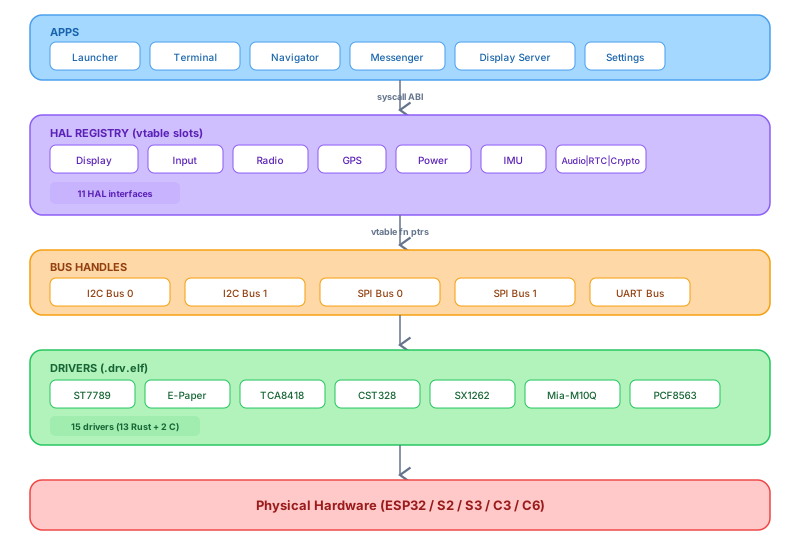
Driver SDK overview
The Driver SDK is a single header: app_sdk/include/thistle_driver.h. It declares the HAL registration functions and the kernel utilities available to drivers.
A runtime driver (loaded from SD card) must export one symbol: driver_init(). This is called by the kernel synchronously during boot, after all compiled-in drivers have been registered. Return 0 on success.
// Minimal driver skeleton
#include "thistle_driver.h"
#include "hal/display.h"

static esp_err_t my_init(const void *config)   { return 0; }
static void      my_deinit(void)               {}
static esp_err_t my_flush(const hal_area_t *area,
                          const uint8_t *data) { return 0; }

static const hal_display_driver_t my_display = {
    .init            = my_init,
    .deinit          = my_deinit,
    .flush           = my_flush,
    .set_brightness  = NULL,
    .sleep           = NULL,
    .set_refresh_mode = NULL,
    .width  = 320,
    .height = 240,
    .type   = HAL_DISPLAY_TYPE_LCD,
    .name   = "my_display",
};

int driver_init(void)
{
    thistle_log("mydrv", "Registering my display");
    return hal_display_register(&my_display, NULL);
}
HAL vtable interfaces
Display — hal_display_driver_t
| Function pointer | Signature | Notes |
|---|---|---|
init | (const void *config) → esp_err_t | Initialize hardware. Config struct is driver-defined. |
deinit | (void) → void | Release hardware resources. |
flush | (const hal_area_t *, const uint8_t *) → esp_err_t | Write pixels to the display. Called by LVGL. |
set_brightness | (uint8_t percent) → esp_err_t | 0–100. Null if unsupported. |
sleep | (bool enter) → esp_err_t | Display sleep / wake. |
set_refresh_mode | (hal_display_refresh_mode_t) → esp_err_t | FULL / PARTIAL / FAST. E-paper only. |
width, height | uint16_t | Physical pixel dimensions. |
type | hal_display_type_t | LCD or EPAPER. |
Input — hal_input_driver_t
| Function pointer | Signature | Notes |
|---|---|---|
init | (const void *config) → esp_err_t | Initialize device. |
deinit | (void) → void | |
register_callback | (hal_input_cb_t, void *) → esp_err_t | Driver calls this callback on every event. |
poll | (void) → esp_err_t | Called periodically if the driver is polled (not interrupt-driven). |
is_touch | bool | True for touch panels; false for keyboards/buttons. |
Radio — hal_radio_driver_t
| Function pointer | Signature |
|---|---|
set_frequency | (uint32_t freq_hz) → esp_err_t |
set_tx_power | (int8_t dbm) → esp_err_t |
set_bandwidth | (uint32_t bw_hz) → esp_err_t |
set_spreading_factor | (uint8_t sf) → esp_err_t |
send | (const uint8_t *, size_t) → esp_err_t |
start_receive | (hal_radio_rx_cb_t, void *) → esp_err_t |
get_rssi | (void) → int |
sleep | (bool) → esp_err_t |
Step-by-step: implementing a display driver
This walkthrough implements a driver for a hypothetical SPI LCD. The same pattern applies to any SPI or I2C display.
1. Create the driver component
mkdir -p components/drv_lcd_mydevice/include
mkdir -p components/drv_lcd_mydevice/src
2. CMakeLists.txt
idf_component_register(
    SRCS "src/drv_lcd_mydevice.c"
    INCLUDE_DIRS "include"
    REQUIRES "thistle_hal" "driver"  # ESP-IDF "driver" for GPIO/SPI
)
3. Config struct in the header
// include/drv_lcd_mydevice.h
#pragma once
#include "hal/display.h"
#include "driver/spi_master.h"
#include "driver/gpio.h"

typedef struct {
    spi_host_device_t spi_host;
    gpio_num_t        pin_cs;
    gpio_num_t        pin_dc;
    gpio_num_t        pin_rst;
    uint32_t          spi_clock_hz;
} lcd_mydevice_config_t;

const hal_display_driver_t *drv_lcd_mydevice_get(void);
4. Driver implementation
// src/drv_lcd_mydevice.c
#include "drv_lcd_mydevice.h"
#include "esp_log.h"

static const char *TAG = "drv_lcd_mydevice";
static const lcd_mydevice_config_t *s_cfg;
static spi_device_handle_t s_spi;

static esp_err_t lcd_init(const void *config)
{
    s_cfg = (const lcd_mydevice_config_t *)config;

    // Toggle reset pin
    gpio_set_direction(s_cfg->pin_rst, GPIO_MODE_OUTPUT);
    gpio_set_level(s_cfg->pin_rst, 0);
    vTaskDelay(pdMS_TO_TICKS(10));
    gpio_set_level(s_cfg->pin_rst, 1);
    vTaskDelay(pdMS_TO_TICKS(50));

    // Add device to SPI bus
    spi_device_interface_config_t dev_cfg = {
        .clock_speed_hz = s_cfg->spi_clock_hz,
        .spics_io_num   = s_cfg->pin_cs,
        .queue_size     = 7,
    };
    esp_err_t ret = spi_bus_add_device(s_cfg->spi_host, &dev_cfg, &s_spi);
    if (ret != ESP_OK) return ret;

    /* Send init command sequence ... */
    ESP_LOGI(TAG, "LCD initialized");
    return ESP_OK;
}

static esp_err_t lcd_flush(const hal_area_t *area,
                          const uint8_t *color_data)
{
    /* Set column/page address, then DMA the pixel data */
    return ESP_OK;
}

static void lcd_deinit(void)
{
    spi_bus_remove_device(s_spi);
}

static const hal_display_driver_t s_driver = {
    .init            = lcd_init,
    .deinit          = lcd_deinit,
    .flush           = lcd_flush,
    .set_brightness  = NULL,
    .sleep           = NULL,
    .set_refresh_mode = NULL,
    .width  = 320,
    .height = 240,
    .type   = HAL_DISPLAY_TYPE_LCD,
    .name   = "lcd_mydevice",
};

const hal_display_driver_t *drv_lcd_mydevice_get(void)
{
    return &s_driver;
}
5. Register it in a board definition
// In your board_*/src/board_*.c
#include "drv_lcd_mydevice.h"

static const lcd_mydevice_config_t lcd_cfg = {
    .spi_host    = SPI2_HOST,
    .pin_cs      = GPIO_NUM_10,
    .pin_dc      = GPIO_NUM_11,
    .pin_rst     = GPIO_NUM_12,
    .spi_clock_hz = 40000000,
};

// In board_init():
hal_display_register(drv_lcd_mydevice_get(), &lcd_cfg);
Implementing an input driver
Input drivers are interrupt-driven. When the hardware fires an interrupt, the ISR reads the event and calls the registered callback. Here is the pattern used by the TCA8418 keyboard driver:
static hal_input_cb_t   s_callback;
static void             *s_user_data;

static void IRAM_ATTR kbd_isr(void *arg)
{
    /* Read key event from TCA8418 over I2C (in a task, not ISR)
     * — use a binary semaphore to signal a task */
    BaseType_t woken = pdFALSE;
    xSemaphoreGiveFromISR(s_isr_sem, &woken);
    if (woken) portYIELD_FROM_ISR();
}

static void kbd_task(void *arg)
{
    while (1) {
        xSemaphoreTake(s_isr_sem, portMAX_DELAY);

        /* Read key from TCA8418 */
        uint8_t key_event = tca8418_read_key();
        hal_input_event_t evt = {
            .type      = (key_event & 0x80) ?
                         HAL_INPUT_EVENT_KEY_DOWN :
                         HAL_INPUT_EVENT_KEY_UP,
            .timestamp = esp_timer_get_time() / 1000,
            .key       = { .keycode = key_event & 0x7F },
        };

        if (s_callback)
            s_callback(&evt, s_user_data);
    }
}

static esp_err_t kbd_register_callback(hal_input_cb_t cb, void *ud)
{
    s_callback  = cb;
    s_user_data = ud;
    return ESP_OK;
}
Using ESP-IDF APIs from a runtime driver
Runtime drivers (.drv.elf) cannot call ESP-IDF functions directly — those symbols live in the kernel's flash and are not exported. Instead, the kernel re-exports the most commonly needed GPIO, I2C, and SPI functions through the syscall table.
Currently exported hardware symbols include:
gpio_set_direction,gpio_set_level,gpio_get_levelspi_bus_add_device,spi_device_transmit,spi_bus_remove_devicei2c_master_transmit,i2c_master_receivevTaskDelay,xTaskCreate,xSemaphoreCreateBinaryesp_timer_get_time
Building as a runtime driver (.drv.elf)
Runtime drivers use the same CMake flags as apps: position-independent, no stdlib, relocatable output.
add_executable(drv_lcd_mydevice src/drv_lcd_mydevice.c)

target_include_directories(drv_lcd_mydevice PRIVATE
    include
    ${THISTLE_SDK_PATH}/include
)

target_compile_options(drv_lcd_mydevice PRIVATE
    -fPIC -nostdlib -fno-exceptions
)

target_link_options(drv_lcd_mydevice PRIVATE
    -nostdlib -Wl,-relocatable
)

set_target_properties(drv_lcd_mydevice PROPERTIES SUFFIX ".drv.elf")
Deploy by copying to the SD card:
cp build/drv_lcd_mydevice.drv.elf /sdcard/drivers/
# Reboot — the kernel will load it during driver_manager_init()
Signing and publishing
Driver signing follows the same process as app signing. See Security & Signing. In the app store catalog, use "type": "driver" to distinguish drivers from apps.